
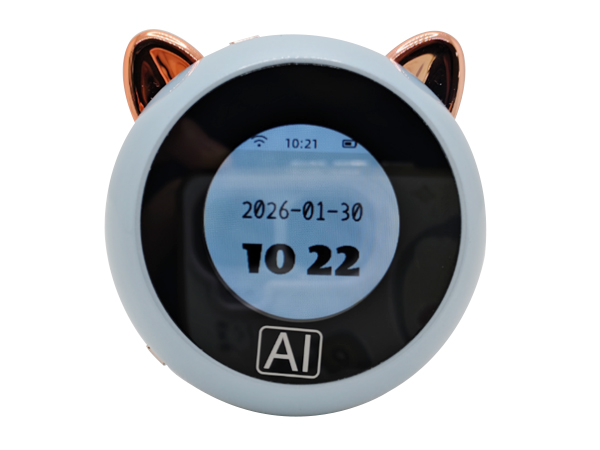


一. Product Overview
The AI toy series is primarily used in AI smart products, such as desktop AI ornaments, children's AI plush toys, and children's AI robot toys. They are suitable for applications related to emotional companionship, early childhood education, and daily life assistance .
The product series can achieve the following functions:
• Voice chat
• Learning Q&A
• Play music
• Play the story
• Language translation
• Check the weather
• Alarm reminder
• Schedule Management
二. Specifications
|
project |
Specifications |
Remark |
|
|
1 |
Battery |
Lithium-ion battery, 3.7V, 500mAh, 1.85Wh |
It can be enlarged as needed, with the maximum size depending on the structural dimensions. |
|
2 |
Battery life |
3H |
The theoretical value may vary in actual use due to various factors (network connection, playback content, etc.). |
|
3 |
Battery charging time |
1.5H |
|
|
4 |
Charging port |
Type-C, 5V or self- adaptive |
|
|
5 |
WIFI |
2.4G (standard) |
5G (customization required) |
|
6 |
trumpet |
4 Ω , 3W |
|
|
7 |
microphone |
Contains *1 |
|
|
8 |
Display screen |
1.28-inch LCD round TFT color screen |
|
|
9 |
power switch |
Includes *1, ON/OFF |
|
|
10 |
function keys |
Includes *2, rst/boot |
三. Function Operation
1. Equipment on/off :
• Turn on the power switch . ON means power on, OFF means power off.
2. button :
• RST key -- Reset, reconfigure network
• Boot button -- Wake up and reconfigure network
3. Network distribution method :
• After the device is powered on for the first time, it will automatically enter the network configuration mode. Connect your mobile phone to the hotspot XXXX-XXXX to configure the network .
• Enter your home WiFi name and password through the web management page (http://192.168.4.1). After saving, the device will automatically restart and connect to the home network .
• Reconfigure the network: Press the rst button and then immediately press the boot button. A network configuration prompt will appear .
4. Add a new device to the management backend :
After the device successfully connects to the network, you need to
go to "AI Chatbot - Control Panel" to add the device and complete the verification before you can use the AI voice chat function normally. The specific steps are as follows:
Access the AI Chatbot Control Panel via your computer browser: https://xiaozhi.me. Register an account if you are not already registered.
• Select "Device Management" from the menu, and find the "Add New Device" entry on the page.
• Enter the 6-digit device ID in the prompt message, then click the "Add Device" button. (Note: To unbind a device, go to Smart Agent -- Device, and click the "×" in the upper right corner of the device list. After unbinding, you can rebind it in the backend management.)
5. Equipment usage:
• Wake-up: 1. Wake-up word: "Hello, XX"
2. Press the boot button to wake up.
• Interruption: Interrupt using the wake word or the boot button.
• Display: 1. RGB lighting:
• Initialization phase: Blue light flashes
• Initialization complete and the device enters standby mode: a beep sounds and the indicator lights turn off.
• Listening Phase: Red Light On
• Speaking phase: Green light on
Standby mode: Off
2. LCD screen model: The current status is displayed in the top status bar.

 Twitter
 Facebook